
Housing.com (2025)
Mobile & Desktop Web Design System
(Demand)

Duration
5 Months (July'25-December"25)
Platform
Web
Team
Design Team & Eng./Development Team
About Housing.com
Housing.com is one of India’s leading digital real estate platforms that helps users buy, rent, and sell homes while enabling brokers, agents, and builders to manage property discovery and lead generation efficiently.
Knowing Users
Housing.com served two major user groups with distinct goals:
B2C Users
Homebuyers searching for verified listings
Tenants exploring rental homes
Property owners listing homes
Users comparing prices, localities, and amenities
B2B Users
Real estate agents managing inventory and leads
Brokers handling customer pipelines
Builders showcasing projects
Internal business and operations teams
Designing for both meant balancing trust-led consumer experiences with efficiency-led business workflows.
Introduction
When I joined Housing.com as a Product Design Intern, multiple pods were working simultaneously across products and features. While execution speed was high, the design ecosystem lacked consistency and structure.
Different teams had created their own UI solutions over time, resulting in fragmented experiences across web and mobile. Components such as buttons, forms, cards, filters, and navigation patterns looked and behaved differently depending on the product area.
This inconsistency began affecting shipping velocity. Developer handoff was often confusing due to duplicated components, unclear states, inconsistent naming, and scattered design files. The company needed a shared design language that could bring consistency, speed, and better collaboration across teams.
Identifying The Problems
After reviewing product screens, Figma libraries, and handoff workflows, a few recurring challenges became clear:
Multiple versions of the same UI components existed across pods
Typography, spacing, and color usage lacked consistency
Designers were repeatedly solving already-solved problems
Handoff files were difficult for developers to interpret
Missing states caused implementation assumptions
Product experiences felt disconnected
The issue was not the capability - it was the absence of scalable system.
Phase 1: Establishing Foundation
The first phase focused on creating the core building blocks that every future screen and component could rely on. Instead of jumping directly into components, it was important to first align the fundamentals.
Conducted UI audits across web and mobile products
Identified repeated patterns and inconsistencies
Defined typography hierarchy and spacing scale
Standardized color tokens, shadows, radius, and grids
Introduced naming conventions for styles and assets
Reorganized messy libraries into cleaner Figma structures
This phase helped remove subjective design decisions from daily workflows. Designers no longer had to decide spacing, font sizes, or colors from scratch each time. It also laid the groundwork for easier collaboration since teams now had a shared visual language.
Phase 2: Building Components
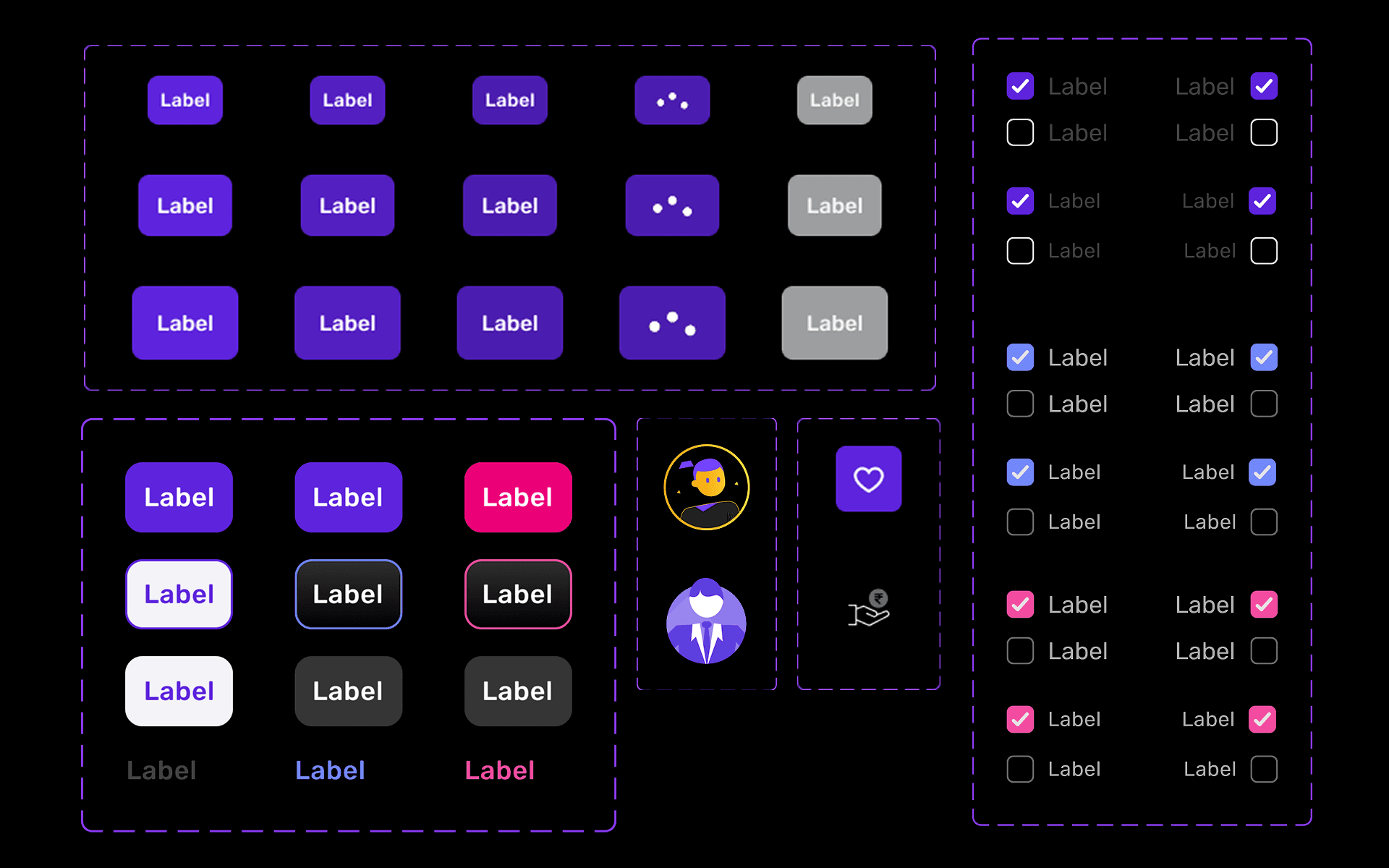
Built a library of reusable components (buttons, inputs, navigation, cards, modals).
Parallelly handled UX improvement tickets, ensuring components responded to growing product needs.
This phase significantly improved design speed. Instead of rebuilding flows screen by screen, teams could assemble interfaces using ready components. But also simultaneously revealed some undiscovered discrepancies .
Phase 3: Iterating On Feedback
After rollout, real product usage revealed practical gaps and scalability challenges, making iteration a critical phase of the system.
Designers shared feedback on flexibility, missing states, and day-to-day usability.
Developers uncovered implementation issues along with architecture-level constraints impacting component scalability.
Cross-functional discussions helped align design needs with technical feasibility.
Multiple iteration loops led to a stronger, revised component structure adopted across all pods.
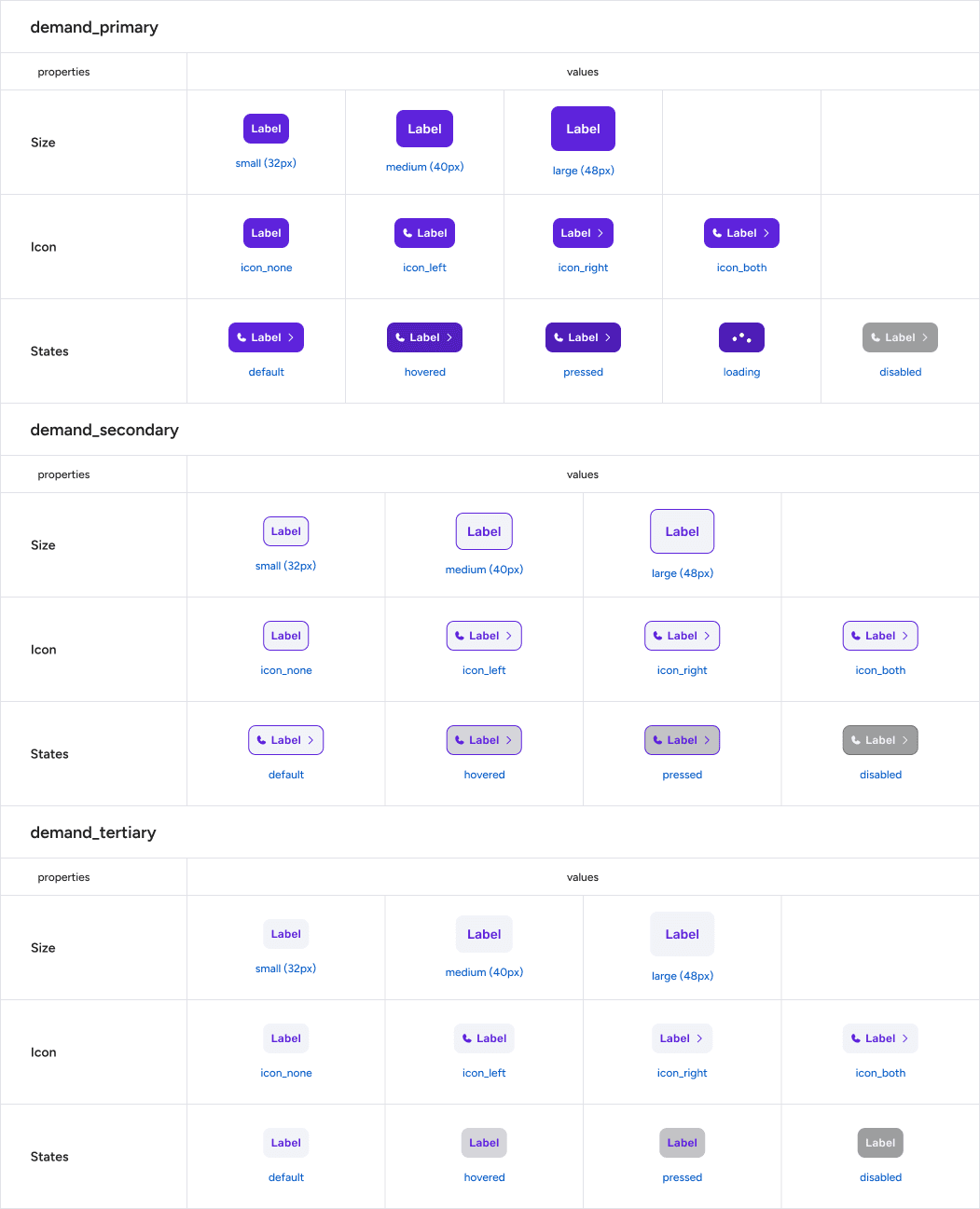
Phase 4: Implementation & Scalibility
Reworked the components not equipped as per dev side requirements by restructuring disruptive and inconsistent components into a cleaner, scalable framework.
Built detailed documentation to give designers and engineers a reliable reference for future adoption and growth.
Established clear guidelines for color usage, interaction states, component behavior, and spacing consistency across products.
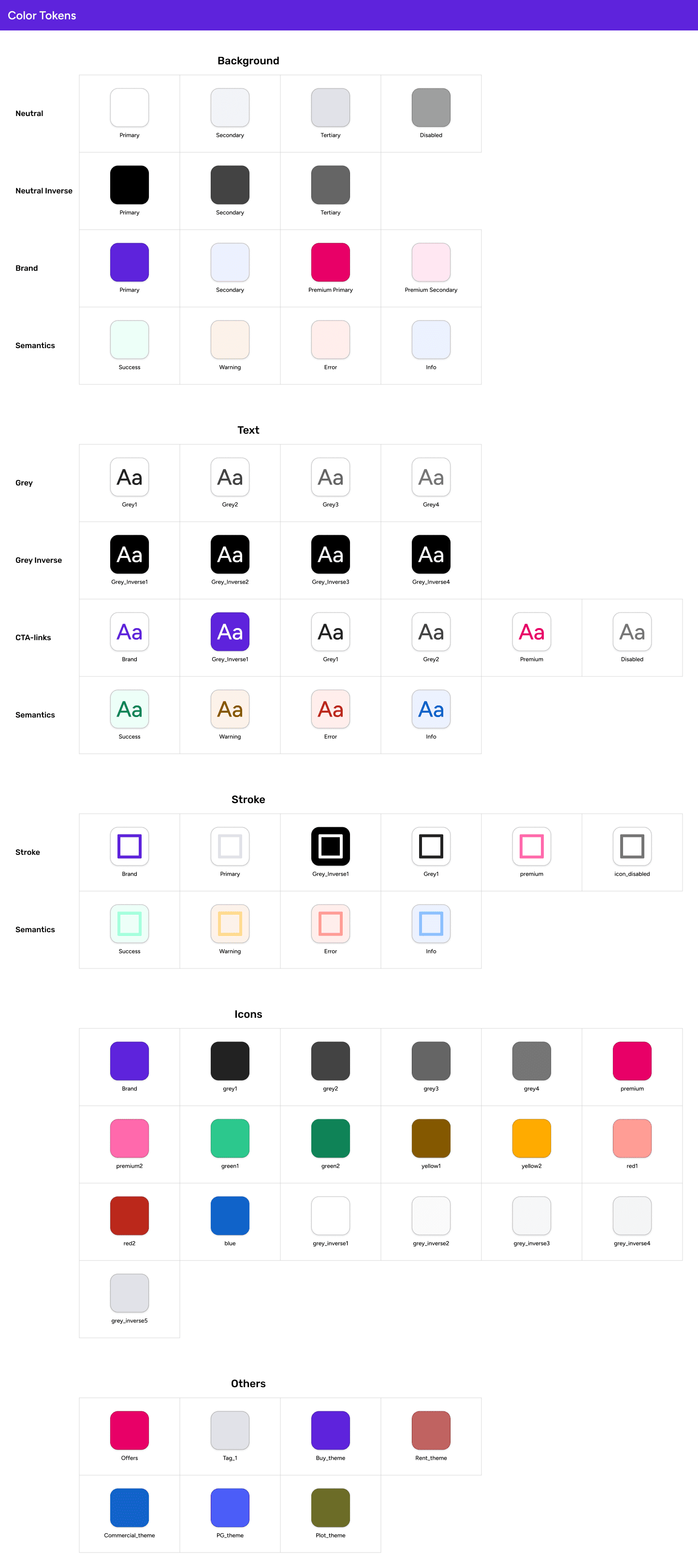
Components
*In compliance with the NDA, only a curated set of components is shared publicly, while the complete file remains accessible upon request. The figma file consists of all components along with documentation.
आप convince हो गए या में और बोलू ?
Let's Connect
Kaam ki baat karte hai ?!
Urvee's Email Copied
Designed with 🫶 by Urvee.